Just read an article about pulling the plug on the advanced search feature of the Financial Times: Newssift.
About one year ago the interface got some pretty positive reactions, due to the fact that this kind of user interface was fearly new on a public website.
Powered by Endeca the functionality heavily made use of facets. All categories, subjects etc. were made-up of metadata in the content, were the values are used to generate the lists of choices.
It's a shame that FT has no logging or other results as to the way the service was used and if the users liked or disliked this new way of searching FT content.
As a search professional I am always looking out for experiences with non-conventional search interfaces. Could this experiment have been more succesfull when guided and analyzed?
See: http://paidcontent.co.uk/article/419-financial-times-shuts-semantic-search-service-newsift/
Posts tonen met het label userInterfaces. Alle posts tonen
Posts tonen met het label userInterfaces. Alle posts tonen
maandag 15 maart 2010


donderdag 11 maart 2010
Excellent clarification on semantic search
Today I received an update on one of te discussions on Semantic search on LinkedIn. Charlie Hull put up an excellent example on how semantic search works. This has to do with the capabilities of the search technology that is used in a specific situation, but also with the fact that a search application has to engage in a dialog with the user to assess his meaning or context. This has to do with the fact that most users just use 1 to 3 words to formulate a query. There's not much you can do with such a query in the first try. But... the search application has to pick up on those keywords and try to make something out of it.
The next step is to try to ask the user what he means.
The next step is to try to ask the user what he means.
Semantic search technology - does it actually exist? 33 comments »
Started by Charlie Hull
At Expert System we have been building semantic search systems for 20 years. Here is what we learned in serving 100's of corporate customers. A semantic search system must establish and store the CONTEXT of content. Then you need an interface to choose the CONTEXT you would like so a match can be made.
Establishing CONTEXT means the following processes must be followed. 1). word morphology (e.g. stems), 2). word roles (e.g. nouns, verbs, etc.) 3). word logic (e.g. subject - verb - object reduction) and 4). sense disambiguation (e.g. assignment of a definition for each word based on the best fit from available alternatives and in the context of the rest of the sentence(s). All 4 of these methods require the use of a semantic network that is both broad - covers the majority of the language to be used and deep - has many ways in which words relate to one another.
With the above approach will you reach a precision ("accuracy") and recall ("completeness") in search beyond the 80% mark. With further customization a 90% mark is easily achieved. Systems that rely on statistical / heuristic methods typically fall far short of these benchmarks. This is true since statistical / heuristic methods cannot fully establish logic and disambiguation.
Finally the interface must be constructed in a way that allows the user to tell the system what CONTEXT the query is in. Full natural language questions using the above methods can do this automatically. But the reality is we live in a 1-3 query word world. So allowing the user to select the word sense of one or more of the query words gives the system much more "to chew on" and is not generally an intrusion for the user. Similar user interface interactions include showing categorical, domain, people, places, organization outcomes from a search which are clickable, showing lists of semantic triples (subject-predicate-object) from which to choose, etc. All of these are at most 1-2 more clicks than a normal keyword based search but improve the experience immensely.
Such interfaces also allow what we call a 3-step walk through search where step 1 is about precision - less of a list, step 2 is an expansion of concepts - to include things related but that you did not know about, and step 3 another step of precision. This "ratcheting" effect therefore begins to bring into the Enterprise Search function other important aspect of corporate work like discovery, exploration and analysis. http://www.expertsystem.net By Brooke Aker
maandag 11 januari 2010
Search User Interface and User Experience
Just found a webpage that I want to share with you: http://www.searchtools.com/info/user-interface.html
Just one page but with a treasure of information about designs and patterns made for search.dinsdag 13 oktober 2009
Information Access is all about the interfaces
Just read this post on Beyond Search about the difference between Google/Apple interfaces and other interfaces in the enterprise that give you access to information. The Image is below.
This funny little comic states what I have always said when talking about interfaces that must help people to find information. They must be simple, yet powerfull.
In my opinion is it necessary to start a dialog based on the initial search. Compare it with a store that you go and ask the sales person "I want a gift". Based on that query, search engines would respond with "0 results". A "gift" is not concrete enough.
The sales person would start asking you questions: "For what occasion?", "Is it for a woman or a man?", etc.
So: Start simple and guide the searching person through the possible answers.
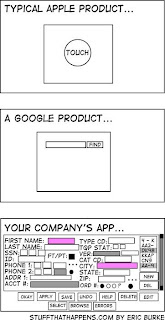
This funny little comic states what I have always said when talking about interfaces that must help people to find information. They must be simple, yet powerfull.
In my opinion is it necessary to start a dialog based on the initial search. Compare it with a store that you go and ask the sales person "I want a gift". Based on that query, search engines would respond with "0 results". A "gift" is not concrete enough.
The sales person would start asking you questions: "For what occasion?", "Is it for a woman or a man?", etc.
So: Start simple and guide the searching person through the possible answers.

Abonneren op:
Posts (Atom)
Subscribe To Me


 Posts
Alle reacties
Posts
Alle reacties